STASHIO / ALL FEATURES

What do you
want to do?

Search for a feature or choose a category below. Each entry includes steps and supported devices.

154 features10 categoriesVI / EN

154 directory entries

Capture & import

19
CoreSave from Google MapsGoogle Maps → Stashio Android · App screenshotsSave from ShareLooking at a link, photo or document? Tap Share → Stashio to save it.See how it works
iPhone · iPadAndroid · Tablet

Try it in the app

Open the content → Share → Stashio. Open Library to see the saved item and processing status.

Device setup guide ↗
CoreSave a page in ChromeChrome → Stashio Web · App screenshotsSave a page in ChromeClick the Stashio icon to save the current page, then read it on a paired device.See how it works
Chrome

Try it in the app

Install the extension and pair your phone. Open a page → Stashio icon → Save this page.

Device setup guide ↗
CoreSave selected textOnly need one passage? Select it and save it from the right-click menu.Read instructions
Chrome

Try it in the app

Select text or right-click a link → choose Save to Stashio.

Device setup guide ↗
CorePaste a place’s detailsStashio Web · App screenshots · Sample dataPaste a message about a placePaste the message someone sent you. Review the details the app picks out, then save.See how it works
iPhone · iPadAndroid · TabletWeb

Try it in the app

In Library, open the add-place/paste action. Paste the text, review the detected fields and save.

Device setup guide ↗
Allowances applyOpen voice recordingStashio Web · App screenshots · Sample dataRecord a voice noteRecord when typing is inconvenient. A transcript is available after AI processing, within your plan’s allowance.See how it works
iPhone · iPadAndroid · TabletWeb

Try it in the app

Choose the Library microphone, grant permission when prompted, record and save. Allow time for processing.

Device setup guide ↗
Allowances applySave photos, PDFs and filesKeep files alongside related links, so you have fewer apps to search through.Read instructions
iPhone · iPadAndroid · TabletWeb

Try it in the app

On your phone, share a file to Stashio. On the web, use the Library add/upload action.

Device setup guide ↗
CoreWrite a noteStashio Web · App screenshots · Sample dataWrite a noteAdd an idea, a list or a quick note directly to your library.See how it works
iPhone · iPadAndroid · TabletWeb

Try it in the app

Open Library → add a note → enter the text → save.

Device setup guide ↗
CoreCheck save progress outside the appFollow progress through Live Activity on supported iPhones or Android notifications.Read instructions
iPhone · iPadAndroid · Tablet

Try it in the app

Share content to Stashio. Allow Live Activities/notifications to see progress where supported. Live Activities require a compatible iOS version, device and connection.

Device setup guide ↗
CoreSave while offlineYour phone keeps the save queued and uploads it when the connection returns.Read instructions
iPhone · iPadAndroid · Tablet

Try it in the app

Share content while offline. Reopen Stashio when online to upload and process it; AI requires a server connection.

Device setup guide ↗
CoreSave what you just copiedCopy a link and open Stashio to use the clipboard save suggestion.Read instructions
iPhone · iPadAndroid · Tablet

Try it in the app

Copy a link → open Stashio → choose Paste on the clipboard prompt.

Device setup guide ↗
Availability variesSave by email when availableRequires Premium and inbound mail enabled for your account. Confirm availability with support first.Read instructions
iPhone · iPadAndroid · Tablet

Try it in the app

Requires Premium and an operational inbound-mail service. Check Forward to save in the app and confirm availability with support before using it. End-to-end delivery on the public release has not been verified.

Device setup guide ↗
Allowances applyImport your bookmarksBring browser bookmarks or supported Pocket and Instapaper exports into Stashio.Read instructions
iPhone · iPadAndroid · TabletWeb

Try it in the app

Open Import, choose a compatible export and review the result. Supported formats are listed in the import screen.

Device setup guide ↗
CoreChoose a Space while savingChoose a Space in the share card so the save starts in the right group.Read instructions
iPhone · iPadAndroid · Tablet

Try it in the app

Create and open a Space first. Share to Stashio → select its name when the Space chips appear on the save card.

Device setup guide ↗
Allowances applyTake and save a photoPhotograph a sign, an item or a page directly in Stashio.Read instructions
iPhone · iPadAndroid · Tablet

Try it in the app

Open the photo/camera action in Library, allow camera access and capture. Review and save; content recognition uses AI allowances.

Device setup guide ↗
CoreUse Android share shortcutsChoose Stashio from Android’s suggested share targets when shown.Read instructions
Android · Tablet

Try it in the app

Open Android’s share sheet and choose Save to Stashio when suggested. Placement is system-controlled; Stashio remains available in the app list.

Device setup guide ↗
Allowances applyFill in saved-item detailsProcessing adds a title, image and tags when the information is available.Read instructions
iPhone · iPadAndroid · TabletWeb

Try it in the app

Save content → allow processing → review its generated title, preview and tags. Edit your own save if something is inaccurate.

Device setup guide ↗
CoreRecover a failed saveRetry processing or edit the details when the app cannot read the content.Read instructions
iPhone · iPadAndroid · Tablet

Try it in the app

Open a failed save or its Library notice. Retry, name it yourself or reread the photo when those actions are available.

Device setup guide ↗
CoreKeep web draftsReturn to your draft. If two tabs edit it, choose which version to keep.Read instructions
Web

Try it in the app

Compose in Library. Offline drafts stay locally. If another tab changes a draft, choose this version, the other version or keep both. A draft has not yet been uploaded.

Device setup guide ↗

Read, listen & understand

19
Allowances applyRead the summary firstLong article? Check the main points before deciding whether to read on.Read instructions
iPhone · iPadAndroid · TabletWeb

Try it in the app

Open a processed article. Read the summary first, then open the reader to go deeper.

Device setup guide ↗
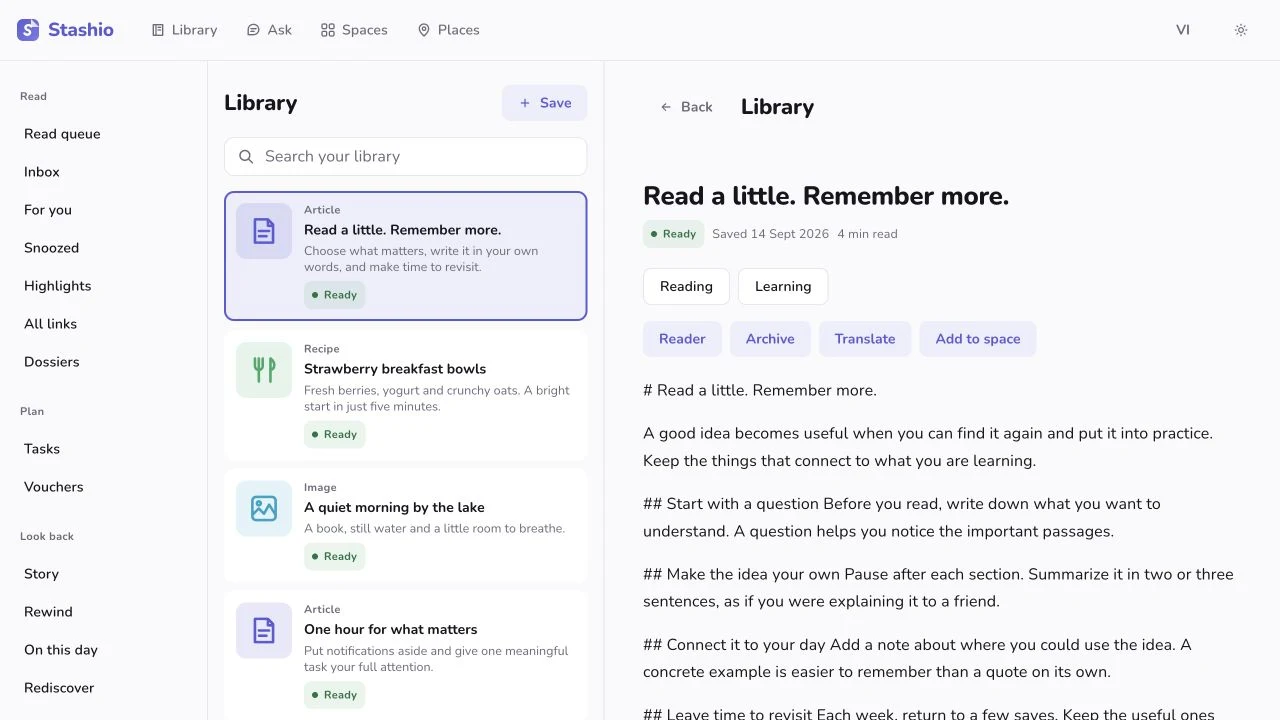
CoreRead a saved articleStashio Web · App screenshots · Sample dataRead the articleRead the extracted article without leaving Stashio.See how it works
iPhone · iPadAndroid · TabletWeb

Try it in the app

Open an article → Read full article. Adjust the reading display in the reader.

Device setup guide ↗
Allowances applyListen to an articleCooking or doing something with your hands? Listen to a saved article.Read instructions
iPhone · iPadAndroid · TabletWeb

Try it in the app

Open an article with readable content → Listen. Use playback and speed controls. Server voices require Premium; device voices vary by platform.

Device setup guide ↗
Allowances applyTranslate an articleOpen a supported translation when an article is in another language.Read instructions
iPhone · iPadAndroid · TabletWeb

Try it in the app

Open the reader → choose translation and a language. Wait for the translated text.

Device setup guide ↗
Allowances applyHighlight a passageHighlight a passage you need, then find it again in your highlights.Read instructions
iPhone · iPadAndroid · TabletWeb

Try it in the app

Select a passage in the reader → highlight it. Open Highlights to revisit it.

Device setup guide ↗
Allowances applyFind text in imagesSave a screenshot or a page photo. Recognized text can help you find it later.Read instructions
iPhone · iPadAndroid · TabletWeb

Try it in the app

Save a clear image containing text, allow processing, then review the recognized content in the saved item.

Device setup guide ↗
Allowances applySee extracted detailsSee addresses, hours and ingredients as separate fields when the source provides them.Read instructions
iPhone · iPadAndroid · TabletWeb

Try it in the app

Open a processed item and review its detail fields. Check against the original source before using them.

Device setup guide ↗
Allowances applyFollow a recipeStashio Web · App screenshots · Sample dataCook step by stepOpen a saved recipe, check the ingredients and follow the steps in the app.See how it works
iPhone · iPadAndroid · TabletWeb

Try it in the app

Open a recipe with detected steps → Cook step by step. Advance as you finish each step.

Device setup guide ↗
CoreReturn to a saved videoKeep the video link for later. Playback and extraction depend on the source.Read instructions
iPhone · iPadAndroid · TabletWeb

Try it in the app

Open a saved video. Play supported content or open the original; playback depends on the source.

Device setup guide ↗
Allowances applyRead a video transcriptFor supported sources, review processed speech and on-screen text.Read instructions
iPhone · iPadAndroid · TabletWeb

Try it in the app

Save a video link → wait for processing → open the extracted content. Availability and processed duration depend on the source, plan and allowances.

Device setup guide ↗
CoreBuild a shopping listCollect ingredients from chosen recipes and tick off what you have bought.Read instructions
iPhone · iPadAndroid · Tablet

Try it in the app

Select recipes in Library → Shopping list. Review and check off ingredients; this list is stored on the device.

Device setup guide ↗
Allowances applyShare a quote as an imageTurn a highlighted passage into an image you can share.Read instructions
iPhone · iPadAndroid · Tablet

Try it in the app

Open Highlights → choose a passage → quote card/share image.

Device setup guide ↗
Allowances applyCheck off extracted actionsReview actions extracted from a save and tick them off when done.Read instructions
iPhone · iPadAndroid · Tablet

Try it in the app

Open a save with action items → review each step → check it off. These checkmarks are kept on the device.

Device setup guide ↗
Allowances applyRead product specificationsRead recognized product specifications in a field-by-field view.Read instructions
iPhone · iPadAndroid · Tablet

Try it in the app

Save a product page with suitable data → open Specifications after processing. Check details with the store.

Device setup guide ↗
Allowances applyCopy text from an imageOpen an image full screen, select the text and copy it.Read instructions
iPhone · iPadAndroid · Tablet

Try it in the app

Open a saved photo full screen, use text selection/recognition where offered, then copy. Recognition depends on the photo and device.

Device setup guide ↗
PremiumChoose a reading voiceChoose from the server voices available to your account.Read instructions
iPhone · iPadAndroid · TabletWeb

Try it in the app

Open Settings → Listen/Reading voice → choose an available voice. Return to an article to try it; languages and voices depend on the current service.

Device setup guide ↗
Allowances applyRead a saved articleStashio Web · App screenshots · Sample dataControl article playbackPause or resume playback, including from lock-screen controls.See how it works
iPhone · iPadAndroid · Tablet

Try it in the app

Start Listen in an article and try speed and playback controls. Where background playback is supported, use the lock-screen controls.

Device setup guide ↗
CoreCopy your highlightsCopy one or several highlights into your other notes.Read instructions
Web

Try it in the app

Open Highlights → copy a passage, an article’s highlights or the whole displayed list. The list is capped, rather than a full-history export.

Device setup guide ↗

Organize & search

19
PremiumSearch when you forget the titleRemember the subject but not the title? Search by meaning with Premium.Read instructions
iPhone · iPadAndroid · TabletWeb

Try it in the app

With Premium, search using a natural description. Content must be processed to support semantic search.

Device setup guide ↗
Allowances applyAsk about your savesAsk a question about your library. Open the cited saves to check the answer.Read instructions
iPhone · iPadAndroid · TabletWeb

Try it in the app

Open Ask → enter a question about your saves → read the answer and open its sources.

Device setup guide ↗
Allowances applyOpen saves in a SpaceStashio Web · App screenshots · Sample dataGroup saves in a SpaceCreate a Space for a trip, project or class, then add related saves.See how it works
iPhone · iPadAndroid · TabletWeb

Try it in the app

Open Spaces → create a Space → name it. Add related items from Library.

Device setup guide ↗
CoreBrowse by tagTap a tag to see other saves with the same tag.Read instructions
iPhone · iPadAndroid · TabletWeb

Try it in the app

Open a saved item → select a tag to see related saves.

Device setup guide ↗
Allowances applyBrowse a topic dossierRead and compare saves grouped around the same topic.Read instructions
iPhone · iPadAndroid · TabletWeb

Try it in the app

Open Dossiers from the Library menu. Choose a topic to explore its related items.

Device setup guide ↗
CoreReview new savesOpen Inbox and review saves one at a time, keeping or archiving them.Read instructions
iPhone · iPadAndroid · TabletWeb

Try it in the app

Open Save inbox → review each item → choose an action. The web includes keyboard controls.

Device setup guide ↗
CoreFind duplicates and failed savesReview flagged saves before deciding what to do with them.Read instructions
iPhone · iPadAndroid · TabletWeb

Try it in the app

Open Tidy up from the Library menu. Review each suggestion before confirming changes.

Device setup guide ↗
CoreAdd a note to a saveStashio Web · App screenshots · Sample dataAdd a note to a saveNote why you saved it, a question to ask or what to do next.See how it works
iPhone · iPadAndroid · Tablet

Try it in the app

Open a save → Notes → add text → Save. This attaches a note to that item, rather than creating a new standalone save.

Device setup guide ↗
CoreCorrect extracted detailsCorrect the title and extracted details of your own save.Read instructions
iPhone · iPadAndroid · Tablet

Try it in the app

Open your own save → Edit → update the relevant fields → Save. A save viewed through someone else’s Space may not be editable.

Device setup guide ↗
Allowances applyAttach files to a saveAdd photos, files or audio to an existing save.Read instructions
iPhone · iPadAndroid · Tablet

Try it in the app

Open a save → Extras → choose a supported photo, file, note or voice memo. Wait for upload; attachments use your plan’s storage allowance.

Device setup guide ↗
CoreFilter by content typeShow only articles, images, recipes or another type you need.Read instructions
iPhone · iPadAndroid · TabletWeb

Try it in the app

In Library, choose a content-type filter and browse saves by date. Clear it to see all saves again.

Device setup guide ↗
CoreAct on several savesSelect several saves to group them or handle them together.Read instructions
iPhone · iPadAndroid · Tablet

Try it in the app

Library → Select → mark saves → choose an available toolbar action. Review the selection before deleting.

Device setup guide ↗
CoreAdd a save to a SpaceAdd existing library items to a Space.Read instructions
iPhone · iPadAndroid · TabletWeb

Try it in the app

Open a save → Add to Space → choose one; or use Add items inside a Space.

Device setup guide ↗
Allowances applyGet grouping suggestionsReview suggested groups of saves before creating a Space.Read instructions
iPhone · iPadAndroid · Tablet

Try it in the app

Open Spaces → Smart groups when suggestions are available → review the saves before creating or using the group.

Device setup guide ↗
CoreSort and pin in a SpaceChange the sort order or pin saves you open often.Read instructions
iPhone · iPadAndroid · Tablet

Try it in the app

Open a Space → sort menu. Choose a view; use item actions to pin, rename or reorder where available.

Device setup guide ↗
CoreOpen saves in a SpaceStashio Web · App screenshots · Sample dataRead beside your libraryOn a wide window, keep your list open beside the item you are reading.See how it works
Web

Try it in the app

Widen the web window → select a Library item. Narrow it to return to the small-screen layout.

Device setup guide ↗
CoreUse keyboard shortcuts in InboxBrowse, open, archive and undo with web keyboard shortcuts.Read instructions
Web

Try it in the app

Open the web Save inbox → press ? for shortcuts. Use j/k to move, o to open, e to archive and u to undo where available.

Device setup guide ↗

Places & maps

09
Allowances applyOpen a place from the mapStashio iPhone · App screenshots · Sample dataSee saved places on a mapSee where your saved cafés and other places are on the map.See how it works
iPhone · iPadAndroid · TabletWeb

Try it in the app

Open Places. Select a pin to view its saved item and directions when available.

Device setup guide ↗
CoreFind saved places nearbySort saved places by distance to choose somewhere nearby.Read instructions
iPhone · iPadAndroid · Tablet

Try it in the app

Open Places → Nearby. Allow location to see distances, then select a place to focus its map pin.

Device setup guide ↗
Allowances applyGet directionsChoose a saved place, view the route and open a maps app for navigation.Read instructions
iPhone · iPadAndroid · TabletWeb

Try it in the app

Open Places → select a pin → directions. Allow location when needed; estimated routes are labelled in the interface.

Device setup guide ↗
Allowances applyFollow your current tripKeep distance and estimated arrival in view while using the app.Read instructions
iPhone · iPadAndroid · Tablet

Try it in the app

Choose a place → Go here. Open the trip bar for ETA or to end the trip. Supported iPhones offer Live Activities; Android has a trip notification. Background updates require the relevant permissions and settings.

Device setup guide ↗
CoreNearby reminder settingsStashio iPhone · App screenshots · Sample dataGet a reminder near a saved placeOn iPhone, enable Right Here and location permission for nearby reminders.See how it works
iPhone

Try it in the app

On iPhone: Settings → Right Here reminders. Enable it, allow Always location and notifications. Delivery depends on the system and quiet hours. This background location reminder is not currently offered on Android.

Device setup guide ↗
CoreFind your saves in a new areaTrip Radar on iPhone resurfaces saved places when you arrive in their area.Read instructions
iPhone

Try it in the app

Requires several geocoded saves in one area, Right Here enabled and background location on iPhone. Open the arrival reminder to revisit the trip.

Device setup guide ↗
Allowances applySee your group’s mapView the places in a Space or the stops in your itinerary on a map.Read instructions
iPhone · iPadAndroid · TabletWeb

Try it in the app

Open a Space → Map. Switch between all places and itinerary order. Stops need coordinates; estimated routes are labelled.

Device setup guide ↗
Allowances applyMap the stops in a saved articleSee recognized destinations from a multi-stop article on a map.Read instructions
iPhone · iPadAndroid · Tablet

Try it in the app

Open a save with multiple recognized places → route map → Open in Google Maps. Missing coordinates and waypoint limits can shorten the route.

Device setup guide ↗
CoreLabel what to do at a placeLabel activities such as dining, coffee or staying overnight.Read instructions
iPhone · iPadAndroid · Tablet

Try it in the app

Open a place → Activities → choose suitable labels.

Device setup guide ↗

Together & realtime

15
Allowances applyChat in a SpaceKeep the conversation next to your group’s plan and links.Read instructions
iPhone · iPadAndroid · TabletWeb

Try it in the app

Open a shared Space → Chat → send a message or file. Web can play voice messages but does not record them in chat.

Device setup guide ↗
Allowances applyInvite someone to a SpaceSend an invite code or link so friends can view and organize saves together.Read instructions
iPhone · iPadAndroid · TabletWeb

Try it in the app

Open a Space → Members/Invite → share the code or link with the person you want to invite.

Device setup guide ↗
Allowances applyClaim a job and finish itStashio Web · App screenshots · Sample dataAssign group tasksClaim or assign tasks so everyone knows who is handling them.See how it works
iPhone · iPadAndroid · TabletWeb

Try it in the app

Open Space jobs → add a job. Members can claim it and update its status.

Device setup guide ↗
Space plan appliesVote on where to goStashio Web · App screenshots · Sample dataVote on placesSuggest a few places, let the group vote and use the result to plan.See how it works
iPhone · iPadAndroid · TabletWeb

Try it in the app

Open Round table in a Space, start a session and let members vote on places.

Device setup guide ↗
Allowances applyCollect group photosAdd photos and notes to the trip for everyone to revisit.Read instructions
iPhone · iPadAndroid · TabletWeb

Try it in the app

Open Memories in a Space. Add photos and revisit the trip collection.

Device setup guide ↗
CoreOpen the same save on the webStashio Android → Web · App screenshotsSee updates as they arriveFollow processing and Space updates while the app is open and online.See how it works
iPhone · iPadAndroid · Tablet

Try it in the app

Open the library on two linked devices. Save on one and watch the other update while connected. This covers status and Space activity, rather than character-by-character collaborative editing.

Device setup guide ↗
Allowances applySend a voice messageRecord and send a voice message when you do not want to type.Read instructions
iPhone · iPadAndroid · Tablet

Try it in the app

Open Space chat → hold the microphone to record → send. Web can play voice messages but does not record them in chat.

Device setup guide ↗
Allowances applyStart a Space from a templateStart with a trip, class fund or household template.Read instructions
iPhone · iPadAndroid · TabletWeb

Try it in the app

Spaces → Create → choose a template → name it and review its tools. Planning access depends on your plan.

Device setup guide ↗
Allowances applyTools inside a SpaceStashio Web · App screenshots · Sample dataOpen your Space’s toolsOpen chat, itinerary, documents and funds from one screen.See how it works
iPhone · iPadAndroid · TabletWeb

Try it in the app

Open a Space to see its available tools. Choose what you need; access and allowances vary by tool.

Device setup guide ↗
CoreMention someone in chatUse @ to bring a person or the whole group into a conversation.Read instructions
iPhone · iPadAndroid · Tablet

Try it in the app

In Chat, type @ → select a member or @everyone → compose and send. Notifications depend on the recipient’s settings.

Device setup guide ↗
Allowances applySend photos and files in chatSend files in the conversation so your group can find them there.Read instructions
iPhone · iPadAndroid · TabletWeb

Try it in the app

Open Space chat → Attach → choose a photo or file → send and wait for upload. Storage allowances apply.

Device setup guide ↗
CoreManage Space membersReview members, manage roles and transfer ownership when needed.Read instructions
iPhone · iPadAndroid · TabletWeb

Try it in the app

Open Members. Owners can use available management actions such as transferring ownership or removing a member; review the confirmation before applying.

Device setup guide ↗
CoreEdit your profileSet your name, picture and color so friends recognize you in a Space.Read instructions
iPhone · iPadAndroid · Tablet

Try it in the app

Settings → Profile → edit your display name, avatar or colour → Save.

Device setup guide ↗
CoreGet suggestions for your SpaceSee suggestions to choose dates, vote or add expenses when relevant.Read instructions
iPhone · iPadAndroid · Tablet

Try it in the app

Open a Space. When a hint card appears, choose its action to open the related tool. Suggestions depend on Space activity.

Device setup guide ↗
CoreInvite friends for more Ask creditsCheck invitation requirements and rewarded Ask credits in the app.Read instructions
iPhone · iPadAndroid · Tablet

Try it in the app

In Ask, open the invite prompt when shown → choose a Space and share its invitation. Rewards depend on a qualifying first join and current limits; review the credited allowance in your account.

Device setup guide ↗

Trips & itineraries

11
Space plan appliesPlan the stopsStashio Web · App screenshots · Sample dataPlan each dayArrange stops by day and time of day so everyone can follow the plan.See how it works
iPhone · iPadAndroid · TabletWeb

Try it in the app

Open a trip Space → Timeline → add and arrange stops.

Device setup guide ↗
Space plan appliesAdd a vehicle for the tripStashio Web · App screenshots · Sample dataArrange ridesAgree on who is taking each vehicle before you leave.See how it works
iPhone · iPadAndroid · TabletWeb

Try it in the app

Open Vehicles in a trip Space. Add vehicles and assign members.

Device setup guide ↗
Space plan appliesKeep trip tickets and documentsKeep tickets, booking references and documents in the trip’s Space.Read instructions
iPhone · iPadAndroid · TabletWeb

Try it in the app

Open a Space → Documents → add a PDF or image for the trip.

Device setup guide ↗
Space plan appliesShare the packingStashio Web · App screenshots · Sample dataMake a packing listList what to bring, claim your items and tick them off when packed.See how it works
iPhone · iPadAndroid · TabletWeb

Try it in the app

Open a Space → Needs → add an item → claim who will bring it.

Device setup guide ↗
Space plan appliesChoose a day that worksStashio Web · App screenshots · Sample dataFind a date that worksLet everyone pick dates that work before settling on one.See how it works
iPhone · iPadAndroid · TabletWeb

Try it in the app

Open a Space → Date poll → select available dates. The organizer can finalize after reviewing responses.

Device setup guide ↗
Allowances applyGroup places into a tripUse suggested groups of nearby places as a starting point for a trip.Read instructions
iPhone · iPadAndroid · Tablet

Try it in the app

With several saves in one area, open a trip suggestion in Spaces. Review its places and create a plan if useful.

Device setup guide ↗
Space plan appliesSee your next stopOpen the trip card for upcoming stops and things to handle today.Read instructions
iPhone · iPadAndroid · Tablet

Try it in the app

Open a Space with a trip currently in progress. Review the day card and select a stop for its details.

Device setup guide ↗
Space plan appliesPlan selected placesChoose saved places and start arranging an itinerary.Read instructions
iPhone · iPadAndroid · Tablet

Try it in the app

Library → Select → mark places → Make itinerary. Review stops, dates and ordering before using it.

Device setup guide ↗
Space plan appliesPlan from your group’s votesUse the group’s choices to build a day-by-day plan.Read instructions
iPhone · iPadAndroid · Tablet

Try it in the app

Open a trip Space → Build plan/Rebuild from votes. Switch between Suggested and Plan, then review ordering and trip totals.

Device setup guide ↗
Space plan appliesPlan the stopsStashio Web · App screenshots · Sample dataKeep booking details per stopKeep references, booking status, costs and call reminders with each stop.See how it works
iPhone · iPadAndroid · Tablet

Try it in the app

Open Timeline → select or add a stop → fill in booking details, reference and cost. Set a call reminder where supported.

Device setup guide ↗
CoreShare the itinerary as textCopy the day-by-day plan into your chat app.Read instructions
iPhone · iPadAndroid · Tablet

Try it in the app

Open a trip Space → Share as a template → review the text → choose a destination in the share sheet.

Device setup guide ↗

Expenses & group funds

10
Space plan appliesRecord a shared expenseStashio Web · App screenshots · Sample dataTrack and split expensesRecord who paid and who is sharing the cost, then see who owes what.See how it works
iPhone · iPadAndroid · TabletWeb

Try it in the app

Open a Space → Expenses → add an amount, payer and participants. Review the settlement.

Device setup guide ↗
Space plan appliesRecord a group contributionStashio Web · App screenshots · Sample dataTrack a shared fundSee contributions, spending and the amount left in the group fund.See how it works
iPhone · iPadAndroid · TabletWeb

Try it in the app

Open Space expenses → Fund → record a contribution and review the balance.

Device setup guide ↗
Allowances applyStart an expense from a receiptScan a receipt, review the detected total and choose who shares the expense.Read instructions
iPhone · iPadAndroid · Tablet

Try it in the app

In Expenses, capture or choose a bill. Check the recognized total, select payer and participants, then save. Enter the total manually if recognition fails.

Device setup guide ↗
CoreCreate a payment QRCreate VietQR for the amount and receiving account. Confirm payment in your banking app.Read instructions
iPhone · iPadAndroid · Tablet

Try it in the app

Set up a receiving account → open settlement → select an amount to show VietQR for VND. Verify recipient and amount in your bank app; Stashio does not transfer money itself.

Device setup guide ↗
CoreSplit with friends without the appAdd a guest to the expense list and send them a link to their share.Read instructions
iPhone · iPadAndroid · Tablet

Try it in the app

In Space expenses, add someone without the app. After recording expenses, create a link showing their portion.

Device setup guide ↗
CoreExport expensesDownload the expense report to keep a copy or check it with your group.Read instructions
iPhone · iPadAndroid · Tablet

Try it in the app

Open Expenses → Export/share. Choose an available format such as Excel, CSV, PDF or a settlement link.

Device setup guide ↗
CoreSet your receiving accountSave receiving details for when the group needs to pay you back.Read instructions
iPhone · iPadAndroid · Tablet

Try it in the app

Settings → Getting paid back → choose a supported bank or wallet and enter the details. Check what the payer will see.

Device setup guide ↗
CoreTrack recurring expensesTrack rent and other shared costs that recur each month.Read instructions
iPhone · iPadAndroid · Tablet

Try it in the app

When adding an expense, open Repeats → choose an available schedule → review its date and save.

Device setup guide ↗
CoreTrack your group budgetSet a budget and see what is left or how much you have gone over.Read instructions
iPhone · iPadAndroid · Tablet

Try it in the app

Open Expenses → set a group budget → enter an amount. Review the remaining or over-budget amount after recording expenses.

Device setup guide ↗
CoreRecord a shared expenseStashio Web · App screenshots · Sample dataAdd an expense in one lineOn the web, type an amount and description in one line to start an expense.See how it works
Web

Try it in the app

In web Expenses, try “120k bún bò”. Review the amount, payer and participants before saving.

Device setup guide ↗

Reminders & rediscovery

17
CoreKeep a reading queueKeep unread articles in one list for when you have time.Read instructions
iPhone · iPadAndroid · TabletWeb

Try it in the app

Open Read queue from Library and choose an article.

Device setup guide ↗
Allowances applyBrowse suggested savesBrowse suggestions from your own library and choose what to revisit.Read instructions
iPhone · iPadAndroid · TabletWeb

Try it in the app

Open For you after building up your library. Review each card and choose an action.

Device setup guide ↗
Allowances applySet a reminderStashio Web · App screenshots · Sample dataSet a reminderNot now? Pick a time to be reminded about the save.See how it works
iPhone · iPadAndroid · TabletWeb

Try it in the app

Open an item’s reminder action, choose a time and review it in Snoozed.

Device setup guide ↗
Allowances applyKeep vouchers and expiry datesSee recognized codes and expiry dates together. Check the issuer’s terms before use.Read instructions
iPhone · iPadAndroid · TabletWeb

Try it in the app

Save voucher content → allow recognition → open Voucher wallet. Check terms with the issuer.

Device setup guide ↗
Allowances applyLook back at this dayRevisit things you saved on this day in earlier years.Read instructions
iPhone · iPadAndroid · TabletWeb

Try it in the app

Once your library has older content, open On this day from the menu.

Device setup guide ↗
Allowances applyReview your year in savesSee a recap of what you saved over time.Read instructions
iPhone · iPadAndroid · TabletWeb

Try it in the app

Open Rewind to view the recap. Publishing a public recap link requires Premium.

Device setup guide ↗
PremiumReview your interests over timeWith Premium, view a chapter-based summary of your library.Read instructions
iPhone · iPadAndroid · TabletWeb

Try it in the app

With Premium and enough library content, open Your story to explore its chapters.

Device setup guide ↗
Allowances applyAdd a task and due dateStashio Web · App screenshots · Sample dataCreate tasks and goalsLink saved articles or files to the tasks you are working on.See how it works
iPhone · iPadAndroid · TabletWeb

Try it in the app

Open Tasks or Goals in Library. Add a task, set a goal and link relevant saves.

Device setup guide ↗
PremiumGet price-drop alertsWatch supported products with Premium for price-drop alerts.Read instructions
iPhone · iPadAndroid · TabletWeb

Try it in the app

Open a product save → Watch price. Premium is required; some shops do not allow automatic price checks.

Device setup guide ↗
Allowances applyReview this week’s savesReview the saves and recurring topics from the past week.Read instructions
iPhone · iPadAndroid · Tablet

Try it in the app

Open Your week in saves in Library when enough content is available. Revisit what you want to read or use next.

Device setup guide ↗
PremiumSee your recent interestsSee recurring topics in your recent saves.Read instructions
iPhone · iPadAndroid · Tablet

Try it in the app

Open Lately you’ve been into in Library when enough data is available. Choose a theme to revisit suggested saves.

Device setup guide ↗
Allowances applyRediscover older savesBrowse older library items alongside your recent saves.Read instructions
iPhone · iPadAndroid · TabletWeb

Try it in the app

Open Rediscover in Library and choose a suggested save. Suggestions depend on your library content.

Device setup guide ↗
CoreSee upcoming datesReview saves with recognized upcoming dates.Read instructions
iPhone · iPadAndroid · Tablet

Try it in the app

Review Upcoming in Library → open a date or save. Check recognized dates against the source.

Device setup guide ↗
CoreAdd an event to CalendarSend recognized event details to your device’s calendar.Read instructions
iPhone · iPadAndroid · Tablet

Try it in the app

Open a dated save → menu → Add to Calendar. Allow access or choose a calendar app when prompted, and review the date and time.

Device setup guide ↗
Allowances applySee scheduled remindersStashio Web · App screenshots · Sample dataReview your remindersReview the saves you scheduled to revisit and their reminder times.See how it works
iPhone · iPadAndroid · TabletWeb

Try it in the app

Open Snoozed from Library → review saves and reminder times → open a save to make changes when needed.

Device setup guide ↗
Allowances applyGet voucher expiry remindersGet reminders for recognized expiry dates so you can check the offer in time.Read instructions
iPhone · iPadAndroid · Tablet

Try it in the app

Save a voucher with an expiry date, review recognition and enable voucher notifications. Delivery timing depends on notification settings.

Device setup guide ↗
Allowances applyBrowse suggestions by keyboardKeep, skip, open or snooze suggestion cards using the keyboard.Read instructions
Web

Try it in the app

Open For you on the web. Follow the on-screen keys: ↑ open, ↓ snooze, → keep, ← dismiss; undo a dismissal where offered.

Device setup guide ↗

Sharing & publishing

07
PremiumShare a Space with a linkPublish a Space you want to share, then send its link or QR code.Read instructions
iPhone · iPadAndroid · TabletWeb

Try it in the app

In a Space’s sharing settings, review its content and enable publishing. Share the link or QR code.

Device setup guide ↗
Allowances applySet a sharing expiryStashio Web · App screenshots · Sample dataShare an expiring linkSet an expiry for a link to one of your saves.See how it works
iPhone · iPadAndroid · Tablet

Try it in the app

Open your save → Share for a while → choose a duration and copy the link. Anyone with the link can view it while it is active.

Device setup guide ↗
PremiumCreate a public pageCollect your published content on an @handle page.Read instructions
iPhone · iPadAndroid · TabletWeb

Try it in the app

Open Public profile, choose a handle, description and content to publish. Review the page before sharing its link.

Device setup guide ↗
PremiumLet link visitors voteEnable voting on a public page so visitors can take part.Read instructions
iPhone · iPadAndroid · TabletWeb

Try it in the app

The owner enables a public page and voting → shares its link. Visitors open the page to review choices and vote while voting is open.

Device setup guide ↗
PremiumEmbed a public SpaceEmbed a published Space on another website.Read instructions
Web

Try it in the app

Use a published Space link in a system supporting embeds/oEmbed. Preview the result; embedding depends on the receiving website.

Device setup guide ↗
PremiumShare your recapPublish a recap you choose to share and send its link.Read instructions
iPhone · iPadAndroid · TabletWeb

Try it in the app

Open Rewind → preview it → use the publishing action when available. Review what will be public before sharing the link.

Device setup guide ↗

Devices, settings & data

28
CoreShow a device pairing codeStashio Web · App screenshots · Sample dataPair web and ChromeScan a QR code with your phone to use your library on a computer.See how it works
iPhone · iPadAndroid · TabletWebChrome

Try it in the app

On your computer, open the web app/extension QR. On your phone: Settings → Linked devices → Scan QR on your computer.

Device setup guide ↗
CoreUse Stashio on a tabletRead and organize on a larger screen with layouts for iPad and tablets.Read instructions
iPhone · iPadAndroid · Tablet

Try it in the app

Open the app on a tablet, rotate to landscape and select an article or Space. Layout adapts to window size.

Device setup guide ↗
CoreExport your savesStashio Web · App screenshots · Sample dataExport your dataDownload an export for backup or to move your data elsewhere.See how it works
iPhone · iPadAndroid · TabletWeb

Try it in the app

Open Settings → Export data. Create an export and download it when ready.

Device setup guide ↗
CoreManage data and AI settingsReview paired devices, AI processing choices and account deletion in Settings.Read instructions
iPhone · iPadAndroid · TabletWeb

Try it in the app

Open Settings to review your options. Read the privacy policy before sharing sensitive content.

Device setup guide ↗
CoreUse the on-device vaultKeep content in an authenticated local vault, without cloud backup.Read instructions
iPhone · iPadAndroid · Tablet

Try it in the app

Open Private Vault in Settings and set up authentication. Vault content stays on this device and is not synced or backed up to the cloud library.

Device setup guide ↗
CoreLock the appRequire biometric authentication when reopening Stashio.Read instructions
iPhone · iPadAndroid · Tablet

Try it in the app

In Settings, enable App Lock using Face ID or your device’s supported biometrics.

Device setup guide ↗
CoreInstall the web appAdd Stashio to your home screen on supported browsers.Read instructions
Web

Try it in the app

After pairing the web app, use the browser’s Install app/Add to Home Screen option where available. Local drafts do not replace uploading a save to the library.

Device setup guide ↗
CoreChoose your Library cardsHide cards you rarely use and keep the ones you want to see.Read instructions
iPhone · iPadAndroid · Tablet

Try it in the app

Settings → Library home cards → toggle individual cards. Some cards only appear when relevant content exists.

Device setup guide ↗
CoreOpen saves from a widgetUse a home-screen widget to open recent saves quickly.Read instructions
iPhone · iPadAndroid · Tablet

Try it in the app

Add a Stashio widget from your device’s home screen. Tap a save to open it; layout and actions vary by operating system.

Device setup guide ↗
CoreShow a device pairing codeStashio Web · App screenshots · Sample dataManage paired devicesReview devices connected to your library and remove old ones.See how it works
iPhone · iPadAndroid · TabletWeb

Try it in the app

Settings → Linked devices → review the list → remove a device when needed. Check its name before confirming.

Device setup guide ↗
CoreRead downloaded content offlineOpen content already stored on your device when you are offline.Read instructions
iPhone · iPadAndroid · Tablet

Try it in the app

First open Library and Spaces while connected. Offline, view cached data; it may be stale and server-dependent actions remain unavailable.

Device setup guide ↗
CoreStart without signing upFinish onboarding to start your library, then pair devices when needed.Read instructions
iPhone · iPadAndroid · Tablet

Try it in the app

Install and open the app → finish onboarding → start saving. To use the same library elsewhere, pair your devices.

Device setup guide ↗
CoreDelete your account and dataIf you decide to leave, open Settings to request deletion.Read instructions
iPhone · iPadAndroid · Tablet

Try it in the app

Settings → Delete account → review the scope and confirm only when intended. Export any data you want to keep first.

Device setup guide ↗
CoreReport or blockReport content for review and manage interactions in Spaces.Read instructions
iPhone · iPadAndroid · Tablet

Try it in the app

Open a content or member menu → choose Report/Block where available. Manage blocked accounts in Settings.

Device setup guide ↗
CoreReport an AI answerSend feedback when an answer about your library is wrong or problematic.Read instructions
iPhone · iPadAndroid · Tablet

Try it in the app

After an Ask answer, choose the report control → select a reason or enter feedback as instructed.

Device setup guide ↗
CoreChoose your notificationsStashio iPhone · App screenshots · Sample dataChoose your notificationsChoose notification types, quiet hours and reminder limits.See how it works
iPhone · iPadAndroid · TabletWeb

Try it in the app

Settings → Notifications → review types, quiet hours and available limits. System permission must still be enabled to receive notifications.

Device setup guide ↗
CoreChange the languageChoose Vietnamese or English and the supported content-language options.Read instructions
iPhone · iPadAndroid · TabletWeb

Try it in the app

Settings → Language → choose app/content preferences. Some changes may require reopening the app; Chrome currently uses English.

Device setup guide ↗
CoreSwitch between light and darkStashio Web · App screenshots · Sample dataChoose light or dark modeChoose a theme or follow your system setting.See how it works
iPhone · iPadAndroid · TabletWeb

Try it in the app

Open appearance settings or change the system light/dark mode when the app follows it. Available options vary by platform.

Device setup guide ↗
CoreReopen the in-app guideRevisit introductions and tips when you need a reminder.Read instructions
iPhone · iPadAndroid · Tablet

Try it in the app

Settings → What Stashio can do or Watch the tour again. Choose a feature to open its workflow where supported.

Device setup guide ↗
CoreCheck remaining AI usage and storageCheck your plan and remaining allowances before using a metered feature.Read instructions
iPhone · iPadAndroid · TabletWeb

Try it in the app

Open Plan and allowances or account settings. Review current AI usage, feature access and storage; purchase prices come from the mobile store.

Device setup guide ↗
CoreRestore your purchaseRestore Premium bought through your device’s app store.Read instructions
iPhone · iPadAndroid · Tablet

Try it in the app

Open Premium → Restore purchases where available. Use the store account that made the purchase and review the result.

Device setup guide ↗
CoreGet supportOpen Settings for feedback, support and the app version.Read instructions
iPhone · iPadAndroid · Tablet

Try it in the app

Settings → Send feedback/Contact support or app information. Choose a channel and describe the issue.

Device setup guide ↗
CoreUse the app without adsStashio does not display in-app ads.Read instructions
iPhone · iPadAndroid · Tablet

Try it in the app

Use the app normally. The privacy policy explains operational and analytics data; no ads does not mean no data collection.

Device setup guide ↗

Check the app for current access and allowances. Availability varies by device, plan and service.

TRY IT WITH YOUR NEXT SAVE

Get Stashio.
Save your first link.

Start on your phone, then pair the web app or Chrome with a QR code.

App StoreiPhone · iPadGoogle PlayAndroid · TabletChromeBrowser extensionWeb appOpen in your browser
The web app and extension pair with the mobile app.
CAPTURED IN THE APP

Open full-size image ↗